Display Transform, HDR, Scopes & Post-Processing
In a scene-referred pipeline, preceding grading nodes shape the physical radiance of light in the scene; the Display Transform then projects that wide dynamic range onto the specific capabilities of your display device. Following this transformation, Post Processing applies screen-referred optical diffusion, organic film grain, and lens character across the final render.
Display Transform: Mapping Scene Radiance to Display Devices
Modern camera sensors capture vast dynamic ranges (14–15+ stops of light), whereas typical desktop monitors display roughly 6–8 stops. Crude mathematical clamping causes skies to clip harshly into unnatural yellow-white blocks.
Alcedo Studio incorporates a dedicated Display Rendering Transform (DRT) that compresses expansive dynamic range while maintaining smooth highlight saturation rolloff and strict hue constancy:
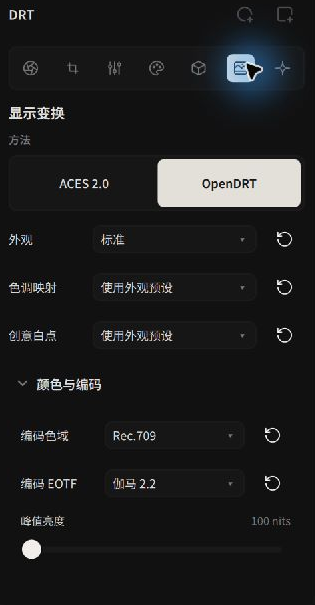 Display Transform configuration: Core mapping algorithm, encoding gamut, and EOTF
Core Transform Methods
- ACES 2.0: The latest standard from the Academy of Motion Picture Arts and Sciences. Features a redesigned tone scale that retains vibrant color purity in near-clipping highlights without the hue shifts observed in older ACES 1.x models.
- OpenDRT: An open-source display rendering transform favored in cinema workflows. Offers deep parameterization, allowing you to fine-tune highlight tonescale slopes, shadow flare compensation, highlight desaturation, and creative white points.
Encoding Gamut & Transfer Functions (EOTF)
Match your target delivery medium:
- Standard SDR & Web Delivery:
- Encoding Space: Standard monitors use
sRGBorRec.709; wide-gamut monitors useDisplay P3. - Encoding EOTF: Select
sRGBorGamma 2.2.
- Encoding Space: Standard monitors use
- HDR Delivery:
- Encoding Space: Wide-gamut
Rec.2020orDisplay P3. - Encoding EOTF: Select Perceptual Quantizer
PQ (SMPTE ST 2084)or Hybrid Log-GammaHLG (ARIB STD-B67). - Peak Luminance: Set to your target monitor's peak nit rating (e.g. 1000 nits or 1600 nits). On macOS with Liquid Retina XDR displays or Apple Pro Display XDR, true real-time viewport HDR preview is natively supported.
- Encoding Space: Wide-gamut
Real-Time GPU Scopes: Waveform & Histogram
Human vision easily adapts to ambient room lighting, creating subjective exposure errors. Relying on objective GPU scopes is essential for professional grading:
- Histogram: Located at the top of the right panel. Displays pixel frequency distribution across Red, Green, and Blue channels. Observe the outer edges to verify that shadows are not crushed to pure black and highlights retain unclipped headroom.
- Waveform: The horizontal axis maps directly to the horizontal pixel coordinates of the image, while the vertical axis indicates luminance levels from 0 to 100 IRE. This spatial alignment reveals the exact luminance of specific image zones (such as sunlight through clouds on the left or shadows on a face on the right), making it ideal for anchoring skin tones (typically between 40 and 70 IRE).
Screen Post-Processing
Following the display transform, the image enters screen-space pixel coordinates. Alcedo Studio provides an authentic suite of finishing effects:
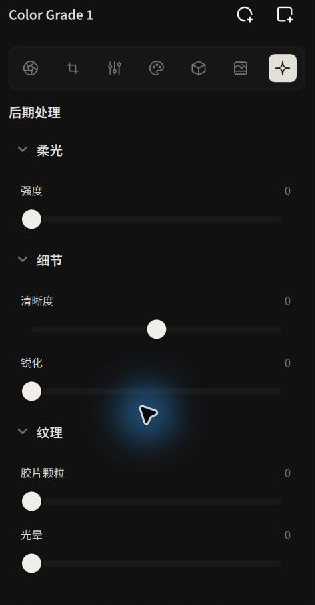 Post Processing: Diffusion glow, clarity, sharpening, and halation
| Module | Optical Simulation | Practical Guidelines & Visual Character |
|---|---|---|
| Diffusion | Simulates cinema Black Pro-Mist filters or vintage lens optical flare. | Causes bright highlights (street lamps, direct sun edges) to bloom into a soft, dreamlike glow, gently easing clinical digital sharpness and softening skin textures. |
| Clarity | Adaptive midtone high-frequency contrast enhancement. | Enhances texture across architecture, rock surfaces, and fabrics; subtle negative values provide a gentle, natural skin smoothing effect. |
| Sharpening | High-frequency edge convolution with radius and threshold parameters. | Counteracts micro-blur from demosaicing interpolation, restoring crisp definition to eyes, eyelashes, and fine textures. |
| Film Grain | Procedural multi-scale organic silver-halide grain synthesis. | Accurately models the physical grain clustering of analog film stocks. Grain is denser in mid-shadows and cleaner in bright highlights, breaking up digital clinical flatness. |
| Halation | Simulates the red optical scatter produced when bright light penetrates cinema film stock (e.g. Kodak Vision3) and bounces off the anti-halation backing. | Infuses high-contrast specular edges with a warm orange-red fringe, a signature aesthetic of analog cinema film. |
You now understand the complete darkroom color pipeline! Continue to A/B Comparison to evaluate your adjustments against baseline references.