Before & After: Version A/B Comparison
During extended grading sessions, human vision rapidly suffers from chromatic adaptation fatigue (often mistaking warm skin casts for neutral). Alcedo Studio provides an A/B Visual Comparison System, enabling objective evaluation of your grade against the original unadjusted frame or side-by-side comparison between multiple named versions.
Launching A/B Comparison & Assigning Sources
You can initiate comparison mode at any time from the main viewport toolbar or the Versions panel:
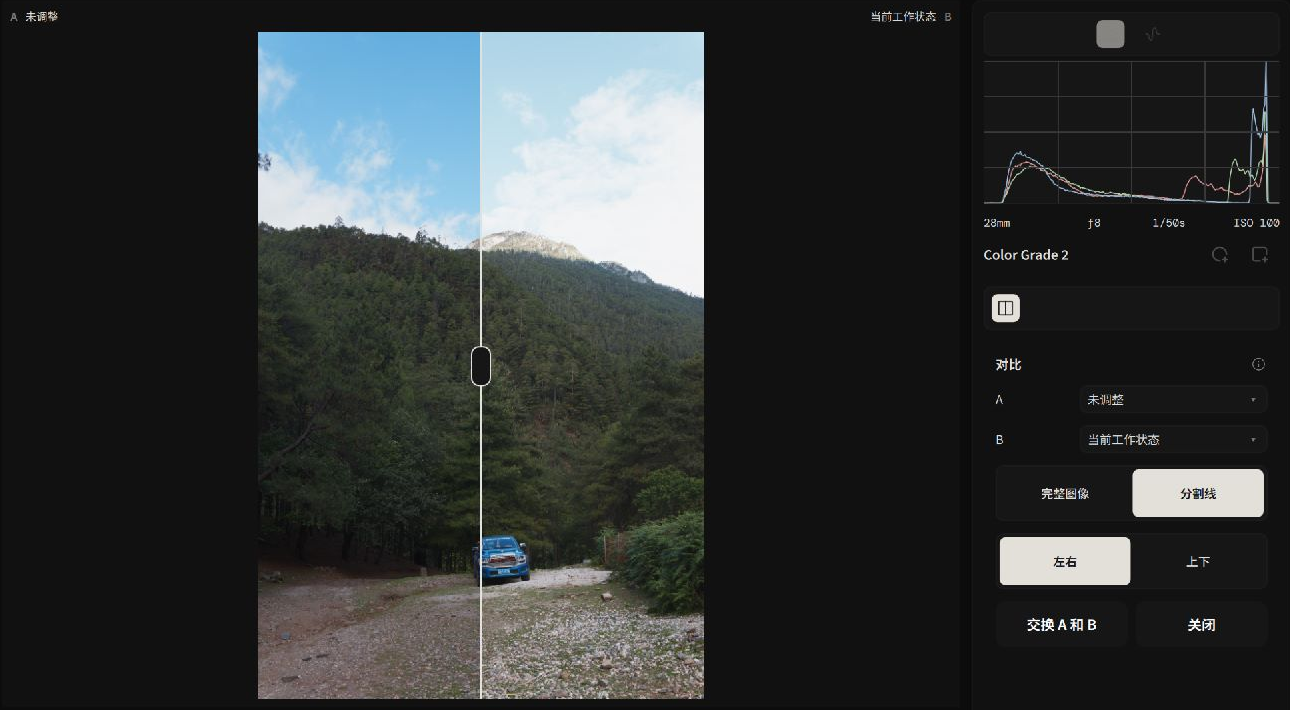 Using the interactive split divider to evaluate before and after treatments
Two Primary Evaluation Scenarios
- Before vs. After:
- Click
Comparein the canvas toolbar. - Side A automatically loads the "Unadjusted" raw baseline, while Side B displays your latest grade.
- Click
- Version A vs. Version B:
- Open the
Versionsdrawer on the left and clickCompare. - Use the Source A and Source B dropdowns to select any two saved version branches (for example, comparing "500T Warm Film" against "Tri-X High Contrast").
- Open the
Comparison Layouts & Interactive Controls
Entering comparison mode reveals the Comparison Controls inspector on the right:
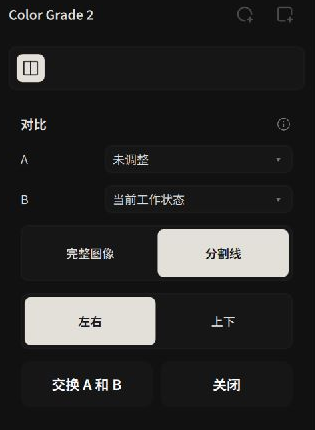 Switching flexibly between split divider, side-by-side, and stacked modes
| Layout Mode | Visual Interaction | Best Practical Use |
|---|---|---|
| Divider | An interactive vertical line spans the canvas. Dragging the divider smoothly reveals either side with pixel-for-pixel spatial alignment. | The most popular micro-inspection mode. Ideal for checking skin shine, eye sharpness, noise reduction boundaries, and subtle vignette falloff. |
| Complete Images: Left / Right | Side-by-side layout rendering two full, un-occluded frames. | Evaluating macro contrast balance, warm/cool color separation, and overall compositional mood. |
| Complete Images: Top / Bottom | Vertically stacked layout displaying two complete frames. | Examining horizon line balance and sky-to-ground contrast in panoramic or wide landscape crops. |
| Swap A and B | Instantly flips the visual positions of Source A and Source B. | Neutralizes subjective left-to-right reading order bias. |
Operational Mechanics & State Safeguards
- Focused Review: While comparison mode is active, GPU resources are dedicated to dual-buffer composition. Parameter sliders and version switching are temporarily locked to prevent accidental parameter mutations during review.
- Retry Mechanism: If video memory pressure delays frame generation, click
Retryto re-trigger the dual-render pipeline. - Instant Exit: When finished, click
Closein the top bar to return to standard editing.
With your adjustments refined and verified, proceed to Export Workflow: Batch Queue & Presets to deliver your finished images!