Automation & alcedo-cli Companion
Alcedo Studio natively includes alcedo-cli, a specialized command-line interface and automation toolkit designed for modern digital darkrooms. Whether handing off batch export renders to automated scripts or inviting AI companion agents to co-edit inside your desktop window, alcedo-cli delivers structured, type-safe RPC endpoints.
Core Execution Modes
alcedo-cli operates in two powerful execution modes:
[ alcedo-cli Automation Hub ]
         │
         ├─▶ Mode 1: Interactive GUI Companion Mode
         │     Connects via local RPC to an active desktop window for real-time collaborative grading
         │
         └─▶ Mode 2: Headless Batch Pipeline Mode
               Executes without a graphical window in server or script environments to batch process catalogs
Binary Location & Basic Commands
- Windows: Bundled alongside the main binary in the application root directory (
alcedo-cli.exe). - macOS: Located inside the application bundle (
AlcedoStudio.app/Contents/MacOS/alcedo-cli).
Run the following commands in your shell to verify connectivity:
# Display help and general usage
alcedo-cli --help

# List all active sessions (GUI windows or background headless sessions)
alcedo-cli --json session list

# Dump the complete API specification and parameter schemas
alcedo-cli schema
Mode 1: Connecting to GUI Windows with AI Agents
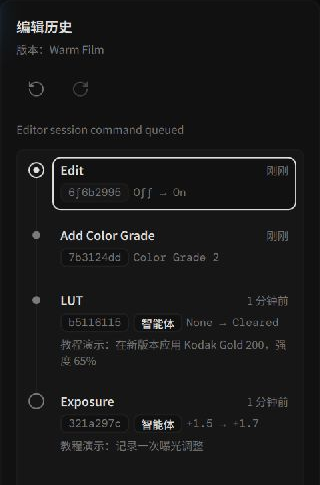 AI agent parameter commits and rationale annotations recorded in history
While you edit in Alcedo Studio, external AI agents can connect to your window via alcedo-cli to assist with adjustments:
1. Control Lock Protocol
To prevent race conditions between human mouse dragging and agent commands, the architecture enforces a strict control acquisition protocol:
- Acquire Control: Before dispatching mutations, the agent must acquire the lock:
alcedo-cli --session <SESSION_NAME> call control.acquire '{"holder_name":"photo-assistant"}' - Interface Response: While the lock is held, parameter sliders in the GUI are temporarily locked, and an agent session card appears in the top task drawer. You can still freely pan, zoom the canvas, or inspect scopes.
- Dispatch Edits: The agent issues grading parameters, branches versions, or binds LUTs, annotating commits with intent (e.g. "Lifted shadow detail to introduce cool cinematic mood").
- Release Control: When finished or upon encountering an error, the agent releases control:
alcedo-cli --session <SESSION_NAME> call control.release '{}' - Emergency Override: You can interrupt agent actions at any time by clicking
Stopin the GUI task bar to instantly reclaim manual control!
Mode 2: Headless Batch Pipelines
For headless servers or automated CI pipelines, launch standalone headless sessions:
# 1. Start a headless session with a project catalog
alcedo-cli session start --headless --project 'D:\Photos\2026_Studio.alcd'

# 2. Call tasks.wait to await background batch export completion
alcedo-cli --session <HEADLESS_SESSION> call tasks.wait '{"task_id":"<task-id>"}'

# 3. Safely terminate the session after saving
alcedo-cli --session <HEADLESS_SESSION> session stop
Core API Capabilities
Using alcedo-cli call <method> '<json_payload>', you can orchestrate nearly all darkroom capabilities:
| Domain | Key Capabilities |
|---|---|
| Catalog & Library | project.open / save, library.import, star ratings, metadata queries, and search. |
| Darkroom Grading | Querying parameter schemas (editor.catalog), reading/writing exposure, white balance, tone curves, and 3D LUTs. |
| Version Branches | Branching named versions (versions.branch), version checkout, and selective adjustment transfer. |
| Batch Tasks | Triggering export queues and monitoring progress via tasks.wait. |
For autonomous editing workflows with LLMs, install the official alcedo skill to establish an intelligent feedback loop!