Export Workflow: Batch Queue, Presets & Metadata
In Alcedo Studio, every modification made during editing is preserved non-destructively in your catalog database. Exporting renders the full GPU color pipeline into standardized, master-grade image files ready for delivery and publishing.
Architecture Overview
Alcedo Studio employs an asynchronous background batch queue. Export rendering executes on dedicated GPU worker threads, allowing you to freely continue culling or grading other photographs without interruption:
[ Select Photos in Library / Filmstrip ] ──▶ [ Add to Export Queue ]
                                                       │
[ Configure Export Presets / Naming / Resizing ] ◀─────┘
       │
       ▼
[ Background GPU Batch Concurrent Rendering ] ──▶ [ Final Master Deliverables (JPEG / 16-bit TIFF / Ultra HDR / OpenEXR) ]
1. Adding Photos to the Export Queue
- Select one or more photos in the
Librarygrid or the bottomFilmstrip. - Click
Add to Queueat the top of the right inspector (or click the+icon on the export queue drawer). - Switch to the
Exportinspector tab to verify your queued items and source file count. - Clearing the queue only removes pending render jobs; it never modifies or deletes photos from your catalog.
2. Professional Export Presets
The Export inspector provides comprehensive presets that configure formats, color profiles, compression, and sizing in a single click:
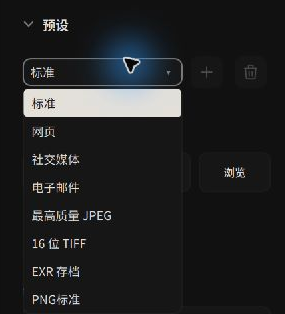 Selecting built-in presets or managing custom export profiles
| Preset Name | Configuration & Specifications | Primary Use Case |
|---|---|---|
| Web | JPEG Quality 80, Long Edge scaled to 2048px, sRGB color space, GPS coordinates stripped automatically. | Web blogs and social platforms; balances compression speed with location privacy. |
| Social Media | JPEG Quality 90, Bounds constrained to 1080 × 1350px (vertical orientation), sRGB, GPS stripped. | Instagram portrait streams and mobile social feeds. |
| Lightweight JPEG Quality 75, Long Edge 1280px. | Rapid client preview proofs and email attachments. | |
| Maximum Quality JPEG | Native resolution, JPEG Quality 100, full EXIF and embedded ICC color profile. | Everyday high-fidelity delivery and digital frame presentation. |
| 16-bit TIFF | Native resolution, 16-bit depth (lossless ZIP compression), full dynamic range preservation. | Fine-art giclée printing, high-end lithography, and master press prep. |
| EXR Archive | Native resolution, 16-bit half-float linear OpenEXR data. | Visual effects (VFX) compositing, 3D pipelines, and archival mastering. |
Custom User Presets
Whenever you modify format parameters, dimensions, or naming patterns, the preset dropdown displays Custom. Enter a custom preset name in the field and click Save to store it permanently in your catalog. Click the trash icon to delete unused profiles.
3. Dynamic File Naming Patterns
Alcedo Studio features a dynamic macro token replacement engine. A live Example preview updates in real time to prevent accidental filename collisions:
{date:yyyy-MM-dd}_{source}_{sequence:0001}
Supported dynamic tokens include:
{source}: Original photo filename (excluding extension).{date:yyyy-MM-dd}: Formatted capture date (yyyyyear,MMmonth,ddday,HHhour, etc.).{sequence:0001}: Zero-padded sequential increment (the number of zeros sets padding width).- Metadata Macros:
{camera_model}(camera body),{lens}(lens name),{iso},{aperture},{shutter},{focal_length},{rating}(star rating).
4. Output Formats, Bit Depth & Resampling
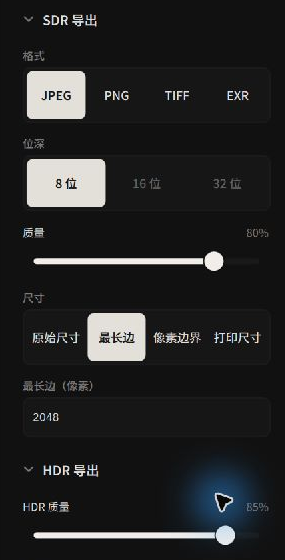 Fine-tuning bit depth, compression algorithms, and physical resampling
Format & Bit Depth Matrix
- JPEG: 8-bit standard compression with fine-grained 1–100 quality slider.
- PNG: 8-bit and 16-bit support with configurable compression levels (0–9).
- TIFF: 8-bit, 16-bit, and 32-bit floating-point with
None,LZW, orZIPlossless compression. - OpenEXR: Industry-standard 16-bit half-float and 32-bit full-float options.
Sizing Modes
- Original: Exports at the full pixel dimensions of your active crop.
- Long Edge: Uniformly scales the longest edge to the specified pixel count while preserving aspect ratio.
- Bounds: Specifies maximum width and height bounds (e.g. 1920 × 1080); fits the entire image proportionally within the box without stretching.
- Print: Specify physical output measurements (mm / cm / in) and target print resolution (e.g. 300 DPI); the engine computes the corresponding pixel resolution automatically.
5. Ultra HDR Next-Generation Export
Alcedo Studio natively supports the Ultra HDR JPEG standard:
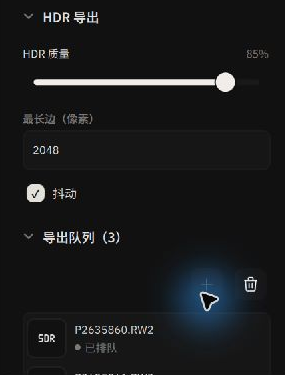 Configuring Ultra HDR Gain Maps, HDR quality, and max edge scaling
- Dual-Compatibility Mechanics: Ultra HDR embeds a GPU-computed luminance gain map inside a standard JPEG container. When viewed on standard SDR displays, it renders as a regular SDR tone-mapped image. When viewed on HDR-capable OLED screens, Apple XDR displays, or modern mobile flagships, the operating system applies the gain map, unlocking specular highlights exceeding 1000+ nits.
- Dedicated HDR Controls: Tune HDR Quality, Dithering, and maximum HDR edge scaling (256–8192px) independently of SDR output rules.
6. Metadata, Color Profiles & Privacy Protection
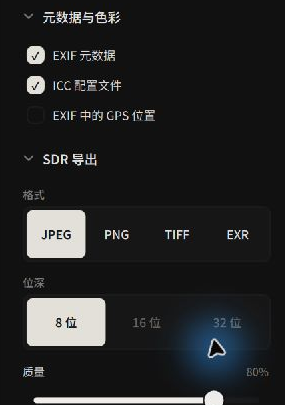 Protecting photographer privacy: Independent GPS location toggle
- EXIF metadata: Toggles whether exposure parameters, camera bodies, and lens models are written into files.
- ICC profile: Strongly recommended! Embeds an exact color profile (e.g. sRGB, Display P3) to prevent browser and OS color shifts.
- GPS location in EXIF:
Recognizing the privacy risks of sharing images shot at private residences or client locations, Alcedo Studio features an independent GPS toggle. Turning it off strips geographic coordinates while preserving exposure data and copyright tags.
7. Starting the Render Queue
- Select your target Destination folder (optionally checking
Put in Subfolder). - Click the blue
Export … Filesbutton. - Queue items transition through states:
Queued→Exporting→Done. - If a file fails, detailed error messages are displayed. Once complete, your master deliverables are ready for client presentation!