Tone, Curves & Color Grading
Alcedo Studio’s grading engine operates in a physically grounded scene-referred wide-gamut linear color space (ACEScg). This architecture ensures that no matter how aggressively you boost exposure or manipulate saturation, highlights roll off with natural optical smoothness and shadows retain organic detail, eliminating the hue shifts and clipped artifacts typical of display-referred tools.
Base Tone: Linear Exposure & Dynamic Range
Under the active grading node, open the Tone panel. The controls follow a photographic progression from global illumination to localized contrast:
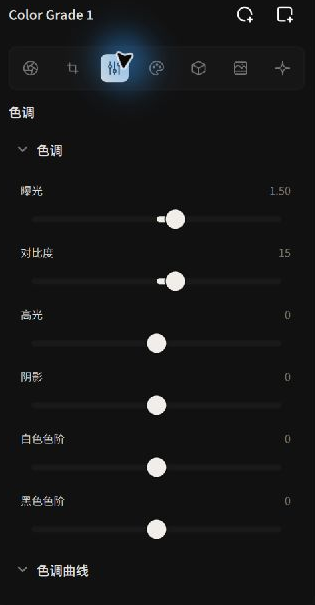 Sculpting light and shadow with physical exposure and bilateral tone mapping
| Control | Physics & Algorithm Mechanics | Practical Tuning Guidelines |
|---|---|---|
| Exposure | Scaled in real photographic exposure values (EV / stops), applying a linear 2^(ΔEV) multiplier to scene radiance. | Establish global scene brightness first while monitoring highlight headroom on the histogram. |
| Contrast | Pivot-based contrast expansion centered around 18% middle gray ($0.18$), backed by a Hue Constancy algorithm. | The default +15 adds rich clarity without yellowing highlights or desaturating midtones under high contrast. |
| Highlights | Compresses bright dynamic range via edge-preserving bilateral filtering. | Recovers cloud textures and specular reflections while preventing halo artifacts along high-contrast borders. |
| Shadows | Localized gradient lifting across low-key regions. | Reveals backlit facial details and architectural shadows while preserving a clean black floor on the waveform. |
| Whites / Blacks | Adjusts the extreme clipping endpoints of the luminance distribution. | Establishes the true white point and black floor, anchoring maximum dynamic range. |
| Tone Curve | Interactive multi-point cubic spline curve. | Left-click to add and drag points; right-click to delete; double-click the curve area to reset. Ideal for fine-tuning S-curve contrast. |
Double-clicking any slider handle in the interface immediately resets the parameter to its default value.
Core Color Science: Two Distinct White Balances
Alcedo Studio features separate white balance controls in RAW Decode and Look. Understanding their underlying color science is key to professional grading:
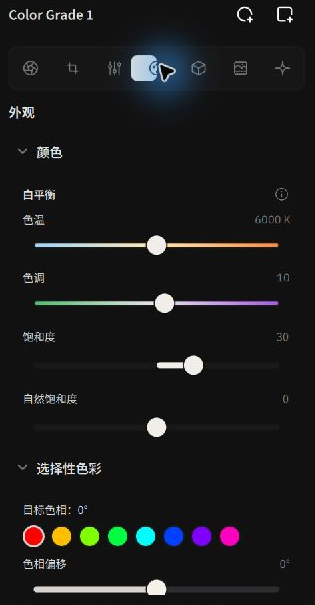 Applying CAT02 creative white balance and hue controls in the Look panel
[ RAW Camera White Balance ] ──▶ Corrects physical sensor illumination ──▶ Objective neutral physical baseline
                                                                                   │
[ CAT02 Creative Look WB ] ◀──── Infuses artistic mood in ACES space ◀──────────────┘ (Golden sunset / Cool cinematic)
- RAW Sensor White Balance (Camera WB):
- Pipeline Stage: Operates prior to demosaicing interpolation.
- Physics: Applies hardware channel multipliers based on the physical spectral absorption of the sensor’s Bayer filters.
- Intent: Calibrates the illuminant color temperature to establish an objectively neutral physical baseline.
- Creative Look White Balance (Look WB):
- Pipeline Stage: Operates inside the scene-referred linear grading node.
- Physics: Implements the CIE-standard CAT02 (CIECAM02 Chromatic Adaptation Transform) matrix. It models the human visual system's perceptual adaptation under changing light.
- Intent: Injects creative color shifts (such as warming a subject’s key light or cooling an ambient background node) without corrupting the underlying sensor calibration. Operates identically on RAW files and raster bitmaps (JPEG/TIFF).
Saturation & Selective Color
In the Look panel, you can independently refine overall vibrance and isolate individual color ranges:
- Vibrance: Selectively boosts muted colors while protecting already saturated tones and preserving delicate human skin hues.
- Saturation: Linear chroma scaling across all color channels.
8-Hue Selective Color Isolation
Expand Selective Color to perform 3D geometric shifts across 8 primary hue families (Red, Orange, Yellow, Green, Cyan, Blue, Purple, Magenta):
- Target Hue: Select the color family to manipulate (e.g. Green for foliage, Orange for portraits).
- Hue Shift: Rotates the color direction (e.g. shifting dry yellow-green grass toward deep emerald, or golden sunsets toward rose peach).
- Lightness: Modulates reflectance brightness of the isolated color (e.g. darkening blue skies for richer cloud separation).
- Chroma: Independently boosts or desaturates purity for the selected color band.
- Hue Smoothness: Adjusts transition bandwidth into neighboring hues, eliminating color posterization and stair-step banding.
Three-Way Color Wheels (Lift / Gamma / Gain)
The definitive color grading interaction favored by digital cinematographers:
- Lift (Shadows / Pedestal): Operates predominantly on dark tones and black levels. Typically pushed toward cool cyan-blue to ground shadows.
- Gamma (Midtones / Power): Covers the majority of skin reflections and primary scene textures, establishing overall emotional warmth.
- Gain (Highlights / Slope): Acts as a slope multiplier affecting specular highlights. Pushed toward warm golden tones to create classic complementary contrast.
- Master Luminance Sliders: Each color wheel includes a dedicated master luminance slider below the disc, allowing you to rebalance zonal brightness without disturbing your color vector. Click
Reset wheelsto return to default.
With your foundational tones and colors sculpted, continue to 3D LUT Library & Color Space Encoding to integrate film simulations and custom lookup tables!